Keap is a customer relationship management (CRM) and sales software platform that helps businesses automate and manage their customer interactions and back-office processes. It includes features such as lead and contact management, email marketing, automated sales and customer workflows, and integrations with other business tools. With Keap, businesses can centralize customer information, automate repetitive tasks, and create a more personalized and efficient customer experience.
Keap is designed to help businesses streamline their sales and marketing efforts, improve customer communication and engagement, and increase efficiency. It offers a range of pricing plans to suit the needs of different businesses, from small startups to large enterprises. Keap can be used by businesses in a variety of industries, including retail, healthcare, and financial services.
One of the key benefits of Keap is its ability to automate many of the routine tasks involved in sales and customer management. This can free up time and resources for businesses, allowing them to focus on more important tasks and strategies. Keap also offers a range of integrations with other business tools, such as marketing automation software and payment processors, which can further streamline processes and improve efficiency.
Overall, Keap is a powerful and comprehensive CRM platform that can help businesses of all sizes and industries manage and grow their customer relationships more effectively.
TLDR – Keap Review Summary
Keap is a customer relationship management (CRM) tool that offers a range of features for sales, marketing, and customer service. It has various pricing plans starting at $19 per month and going up to $799 per month, depending on the features and number of users.
Some pros of using Keap include its automation features, which allow users to streamline tasks and save time, as well as its customizable marketing templates and visual workflow. It also offers excellent customer support and integrations with other tools.
However, some users may find the learning curve for Keap to be steep and may experience quirks with integrations, particularly with WordPress. The search function also has limitations, and the Campaign Builder does not work with Firefox.
Overall, Keap’s features include advanced segmentation, automation, a simple and user-friendly interface, a CRM system for personalized communication and lead categorization, a visual workflow, customizable marketing templates, integrations and affiliations, and automatic follow-ups for failed credit card payments. It also provides tracking and review capabilities for hot leads and clicks and opens of links.
How does Keap work?
Keap is a cloud-based software platform that allows businesses to manage and automate their customer interactions and back-office processes. It includes a range of features and tools to help businesses streamline their sales and marketing efforts, improve communication with customers, and increase efficiency.
To use Keap, businesses first create an account and set up their profile and preferences. They can then start adding and organizing their leads, contacts, and customer information on the platform. Keap includes tools for managing and segmenting lists, tracking customer interactions and activity, and creating and managing deals and opportunities.
Businesses can use Keap’s email marketing and automation features to send targeted and personalized messages to their leads and customers. They can also create and automate workflows for tasks such as lead nurturing and customer onboarding.
In addition to its core CRM and sales features, Keap offers integrations with other business tools, such as marketing automation software, payment processors, and project management platforms. This allows businesses to further streamline their processes and workflows and improve efficiency.
Who is Keap for?
Keap is designed for businesses of all sizes and industries. It can be used by small startups and freelancers, as well as large enterprises. Keap offers a range of pricing plans to suit the needs of different businesses, and its features and tools are designed to be flexible and customizable to meet the specific needs of different users.
Some of the key features and benefits of Keap that may be particularly useful for small businesses and startups include:
- Lead and contact management: Keap provides tools for organizing and managing leads, contacts, and customer information in a centralized database. This can help small businesses keep track of their customer interactions and activity and identify opportunities for follow-up and engagement.
- Email marketing and automation: Keap includes email marketing and automation features that allow small businesses to send targeted and personalized messages to their leads and customers. This can help them nurture and convert leads, as well as maintain and strengthen relationships with existing customers.
- Workflow automation: Keap allows businesses to create and automate workflows for tasks such as lead nurturing, customer onboarding, and sales follow-up. This can save time and resources for small businesses and help them scale their operations more efficiently.
Overall, Keap is designed to be a comprehensive and powerful CRM platform that can help businesses of all sizes and industries manage and grow their customer relationships more effectively.
Keap Pricing
Keap offers two main pricing plans for its platform: Pro and Max. Both plans include a range of features and tools for managing and automating customer interactions and back-office processes, such as lead and contact management, email marketing, and workflow automation. However, the Pro plan has a more limited set of features compared to the Max plan and is generally intended for smaller businesses or those with more basic CRM needs.
Pricing varies based on how many contacts you have in the system and scales up as you add more, so comparisons can be hard. Below is pricing based on 1500 contacts, which for a CRM of a decent-sized business is relatively low.
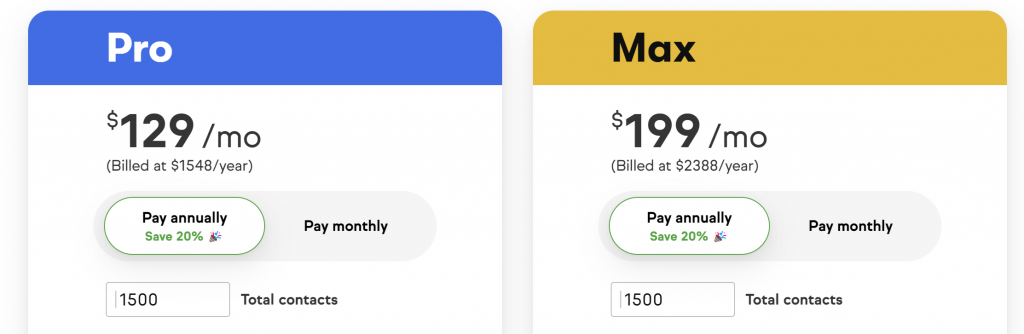
Jumping the contacts up to 10,000 increases pricing by $160 a month. Here is a detailed comparison of the main features and differences between the Pro and Max pricing plans for Keap:
Pro Plan:
- Lead and contact management: The Pro plan includes tools for organizing and managing leads, contacts, and customer information in a centralized database, as well as for tracking customer interactions and activity.
- Email marketing: The Pro plan includes email marketing features that allow businesses to send targeted and personalized messages to their leads and customers.
- Workflow automation: The Pro plan allows businesses to create and automate simple workflows for tasks such as lead nurturing and customer onboarding.
- Integrations: The Pro plan includes integrations with other business tools, such as payment processors and marketing automation software.
Max Plan:
- Lead and contact management: The Max plan includes all of the lead and contact management features of the Pro plan, as well as additional tools for managing deals and opportunities and tracking revenue.
- Email marketing: The Max plan includes all of the email marketing features of the Pro plan, as well as more advanced automation and personalization options.
- Workflow automation: The Max plan allows businesses to create and automate more complex workflows and scenarios, as well as access a library of pre-built automation templates.
- Integrations: The Max plan includes all of the integrations of the Pro plan, as well as additional integrations with other business tools, such as project management software and webinar platforms.
- Advanced features: The Max plan includes additional advanced features, such as custom fields, advanced reporting, and advanced integrations with external APIs.
Overall, the Pro plan is suitable for small businesses and startups with basic CRM needs, while the Max plan is more suitable for larger businesses or those with more advanced CRM requirements. Both plans offer a range of flexible and customizable features to meet the specific needs of different users.
Keap Key Features
Keap includes a range of features and tools to help businesses automate and manage their customer interactions and back-office processes. Some of the key features of Keap include:
- Lead and contact management: Keap provides tools for organizing and managing leads, contacts, and customer information in a centralized database, as well as for tracking customer interactions and activity.
- Email marketing: Keap includes email marketing features that allow businesses to send targeted and personalized messages to their leads and customers.
- Workflow automation: Keap allows businesses to create and automate workflows for tasks such as lead nurturing, customer onboarding, and sales follow-up.
- Integrations: Keap offers integrations with other business tools, such as payment processors, marketing automation software, and project management platforms.
- Advanced features: Depending on the pricing plan, Keap may also include advanced features such as custom fields, advanced reporting, and advanced integrations with external APIs.
- Sales Pipeline: Allows you to easily manage leads and automate the process of turning them into deals as they move through the sales funnel by syncing the CRM with customized pipelines; simply trigger actions to stay on top of things.
Overall, Keap is designed to be a comprehensive and powerful CRM platform that can help businesses of all sizes and industries manage and grow their customer relationships more effectively.
Lead and Contact Management
Lead and contact management are key features of Keap, a customer relationship management (CRM) and sales software platform. These features allow businesses to organize and manage their leads, contacts, and customer information in a centralized database, as well as track customer interactions and activity.
With Keap’s lead and contact management tools, businesses can:
- Add and organize leads and contacts: Businesses can add and organize their leads and contacts in Keap’s centralized database, and assign them to different lists or segments based on criteria such as location, industry, or interests.
- Track customer interactions and activity: Keap allows businesses to track customer interactions and activity, such as emails, phone calls, meetings, and website visits. This can help businesses identify opportunities for follow-up and engagement, and better understand their customers’ needs and preferences.
- Manage deals and opportunities: Depending on the pricing plan, Keap may also include tools for managing deals and opportunities, such as tracking revenue and forecasting sales.
- Customize fields and tags: Keap allows businesses to customize fields and tags to suit their specific needs and requirements. For example, businesses can add custom fields for information such as customer preferences or product interests, or create tags to categorize and organize their leads and contacts.
Overall, Keap’s lead and contact management features are designed to help businesses centralize and organize their customer information, track customer interactions and activity, and identify opportunities for follow-up and engagement. These features can help businesses improve communication with their customers and create a more personalized and efficient customer experience.
Email Marketing
Email marketing is a key feature of Keap, a customer relationship management (CRM) and sales software platform. The email marketing features in Keap allow businesses to send targeted and personalized messages to their leads and customers, as well as automate and track the results of their email campaigns.
With Keap’s email marketing tools, businesses can:
- Create and send email campaigns: Keap provides a range of templates and design tools for creating and sending email campaigns to specific lists or segments of leads and customers. Businesses can also personalize their emails with dynamic content and merge tags, and schedule their campaigns to be sent at specific times or intervals.
- Automate email campaigns: Keap allows businesses to automate their email campaigns based on specific triggers or events, such as a customer’s behavior or a specific date. This can help businesses save time and resources and nurture and convert leads more effectively.
- Track and analyze email results: Keap provides tools for tracking and analyzing the results of email campaigns, such as open and click-through rates, conversion rates, and revenue. This can help businesses understand the effectiveness of their email marketing efforts and make data-driven decisions.
- Integrate with other tools: Keap offers integrations with other business tools, such as marketing automation software, payment processors, and project management platforms. This can further streamline and automate email marketing processes and improve efficiency.
Overall, Keap’s email marketing features are designed to help businesses communicate and engage with their leads and customers more effectively, and drive conversions and revenue. These features can be particularly useful for small businesses and startups looking to grow and scale their operations.
Workflow Automation
Workflow automation is a key feature of Keap, a customer relationship management (CRM) and sales software platform. Workflow automation allows businesses to create and automate repetitive tasks and processes, such as lead nurturing, customer onboarding, and sales follow-up, to save time and resources and improve efficiency.
With Keap’s workflow automation tools, businesses can:
- Create and customize workflow templates: Keap provides a range of templates and design tools for creating and customizing workflow automation scenarios. Businesses can define specific triggers or events that will initiate a workflow, as well as the actions or steps that will be taken as part of the workflow.
- Automate repetitive tasks: Keap allows businesses to automate repetitive tasks such as sending emails, assigning tasks, or updating records. This can help businesses save time and resources and focus on more important tasks and strategies.
- Monitor and track workflow performance: Keap provides tools for monitoring and tracking the performance of workflow automation scenarios, including metrics such as completion rate and efficiency. This can help businesses identify areas for improvement and optimize their workflow automation efforts.
- Integrate with other tools: Keap offers integrations with other business tools, such as marketing automation software, payment processors, and project management platforms. This can further streamline and automate workflow processes and improve efficiency.
Overall, Keap’s workflow automation features are designed to help businesses automate and streamline their customer-related tasks and processes, and create a more personalized and efficient customer experience. These features can be particularly useful for small businesses and startups looking to scale their operations.
Advanced Features
Advanced features are a set of additional tools and capabilities available in Keap, a customer relationship management (CRM) and sales software platform. These features are generally included in the Max pricing plan, and are designed to provide businesses with more advanced and customizable CRM capabilities.
Some of the key advanced features of Keap include:
- Custom fields: Keap allows businesses to create custom fields for storing and organizing specific types of information, such as customer preferences or product interests. This can help businesses tailor their CRM data and processes to their specific needs and requirements.
- Advanced reporting: Keap provides advanced reporting and analytics tools that allow businesses to analyze and visualize their CRM data in more detail. These tools can help businesses identify trends and patterns, and make data-driven decisions.
- Advanced integrations: Keap offers advanced integrations with external APIs and other business tools, such as project management software and webinar platforms. This can further streamline and automate CRM processes and improve efficiency.
Overall, Keap’s advanced features are designed to provide businesses with more advanced and customizable CRM capabilities and help them optimize and scale their operations more effectively. These features may be particularly useful for larger businesses or those with more complex CRM requirements.
Keap Integrations
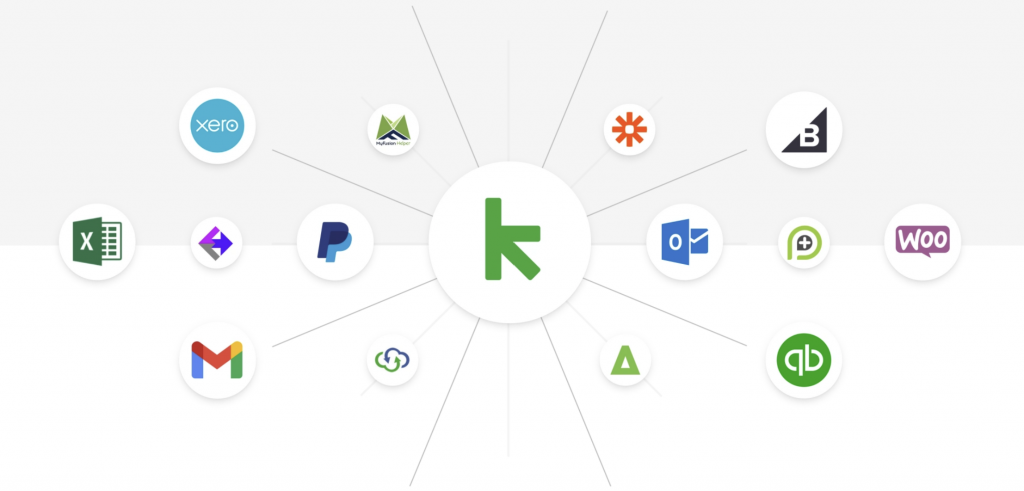
Keap is a customer relationship management (CRM) and sales software platform that offers a range of integrations with other business tools and platforms. These integrations allow businesses to further streamline and automate their CRM processes and workflows, and improve efficiency.
Some of the tools and platforms that Keap integrates with include:
- Marketing automation software: Keap integrates with marketing automation tools such as Marketo and Pardot, allowing businesses to automate and track their marketing campaigns and activities.
- Payment processors: Keap integrates with payment processors such as PayPal and Stripe, allowing businesses to process and track payments and transactions.
- Project management platforms: Keap integrates with project management tools such as Asana and Trello, allowing businesses to manage and track projects and tasks in a centralized platform.
- Webinar platforms: Keap integrates with webinar platforms such as GoToWebinar and Zoom, allowing businesses to schedule and host webinars and events.
- External APIs: Keap offers advanced integrations with external APIs, allowing businesses to connect and integrate their CRM data and processes with other systems and platforms.
Overall, Keap’s integrations with other business tools and platforms are designed to help businesses streamline and automate their CRM processes and workflows, and improve efficiency. The specific integrations available may vary depending on the pricing plan and specific needs of the business.
The Pros and The Cons
Pros of Keap:
- Comprehensive and flexible: Keap is a comprehensive and flexible CRM platform that includes a range of features and tools for managing and automating customer interactions and back-office processes.
- Customizable: Keap allows businesses to customize their CRM data and processes to suit their specific needs and requirements, such as by creating custom fields or tags or by integrating with other business tools.
- Scalable: Keap offers a range of pricing plans to suit the needs of different businesses, from small startups to large enterprises. This allows businesses to scale their CRM operations as their needs change.
- The sales and marketing automation feature helps keep everything in one place.
- Keap is easy to set up and helps users organize their routine tasks.
- It has advanced action-based segmentation capabilities.
- Customer support and service is excellent.
- The campaign builder is one of Keap’s best services and can be easily mapped out.
- It is effective at reviewing hot leads and tracking clicks and opens of links.
Cons of Keap:
- While you can add new fields and define their types, you cannot hide existing tabs that are not needed.
- Some users have reported that Keap’s integrations can be quirky, particularly with WordPress.
- If you do not save your information or work, it will be lost.
- The search function in Keap has limitations.
- The learning curve for Keap may be steep for nontechnical users.
- The search function in Keap has limitations.
Overall, Keap is a powerful and comprehensive CRM platform that can offer a range of benefits to businesses of all sizes and industries. However, it is important for businesses to carefully consider their specific needs and requirements and evaluate the pros and cons of Keap and other CRM platforms before making a decision.
Keap Competitors and Alternatives
Keap is a customer relationship management (CRM) and sales software platform that competes with other CRM platforms in the market. Some of the main competitors of Keap include:
- Salesforce: Salesforce is a leading CRM platform that offers a range of features and tools for managing and automating customer interactions and back-office processes.
- Zoho CRM: Zoho CRM is a cloud-based CRM platform that includes a range of features and tools for managing and automating customer relationships and sales processes.
- HubSpot CRM: HubSpot CRM is a CRM platform that includes a range of features and tools for managing and automating customer interactions, as well as integrations with other marketing and sales tools.
- Microsoft Dynamics: Microsoft Dynamics is a CRM platform that includes a range of features and tools for managing and automating customer interactions and sales processes, as well as integrations with other Microsoft products and platforms.
- Copper: Copper is a CRM platform specifically designed for small businesses and startups, and includes a range of features and tools for managing and automating customer interactions and sales processes.
- Ontraport: Ontraport is a CRM tool that offers features for sales, marketing, and customer service. It is comprehensive automation capabilities, which allow users to streamline tasks and save time
These are just a few examples of the main competitors of Keap in the CRM market. There are many other CRM platforms available, each with its own specific features and capabilities, and businesses should carefully evaluate their options to determine the best fit for their needs.
Keap Review – Is it For You?
Keap CRM is a sales and marketing engine that is well-integrated and comes with a high price tag. However, the cost includes unlimited emails and templates that can be sent to all the contacts in your database. It also has real-time payment integrations with ecommerce platforms like Shopify and automatic quote-to-invoice conversions for leads that become clients.
One of Keap’s main selling points is its ease of use, with clear user journeys, helpful pop-up tips, and an action-oriented interface. It is easy to add contacts, and appointments, and send email campaigns using the platform. While it offers advanced tracking and A/B testing for email campaigns, sales reporting and analytics are only available on the Pro and Max plans. However, the reporting is not as customizable as competitors like HubSpot CRM or Zoho CRM.
Keap’s workflow automation is a standout feature, available across all plans, and can replace manual tasks with triggers based on sales stages, contact details, email engagement, payments, and more.
Overall, while Keap is pricey, it is a good choice for small teams looking to grow their business. It has a compelling set of tools and is well-suited for businesses that are ready to take their growth to the next level.
Keap CRM is a good choice for:
- Businesses setting up their first CRM system
- E-commerce businesses that will benefit from Keap’s payment and checkout features
- Companies looking for simple sales and marketing tools in one platform
Keap CRM may not be the best option for:
- Large businesses with over 25,000 contacts
- Businesses that want a lot of free integrations
- Businesses that want to send more than 250 promotional texts per month
Keap Frequently Asked Questions (FAQ)
What is Keap?
Keap is a customer relationship management tool that offers a range of features for sales, marketing, and customer service. It has various automation features to help users streamline tasks and save time, as well as customizable marketing templates and a visual workflow.
Is Keap free?
No Keap does not offer a free plan. However, you can sign up for a 14-day free trial.
Does Keap offer a free trial?
Yes, Keap offers a 14-day free trial of the Pro plan and does not require a credit card to sign up.
How much does Keap cost?
Keap has a 14-day free trial. Pricing is based on total contacts and users. Starting points for the Pro and Max pricing are as follows;
- Pro: Starting at $129 a month when paying annually for 1500 contacts and 2 users. Pro monthly licensing starts at $169
- Max: Starting at $199 a month when paying annually for 1500 contacts and 3 users. Pro monthly licensing starts at $249
Additional user licenses cost $29 per user per month above the plans listed users.
Is Keap the same as Infusionsoft?
In January 2021, Infusionsoft rebranded as Keap. The company stated that the new name symbolizes the determination and enthusiasm that entrepreneurs have for growing their businesses.
Where is Keap’s headquarters?
Keap’s headquarters is located in Chandler, Arizona.
Who created Keap?
Keap (formerly Infusionsoft) was co-founded by Eric Martineau and Scott Martineau in Mesa, Arizona, along with the current CEO, Clate Mask.
Who uses Keap?
Keap is most commonly used by small businesses with 1-50 employees.
What is Keap’s best feature?
The campaign builder is one of Keap’s best services and can be easily mapped out. Users also report that the automated sales alerts and tasks are an incredible feature.
Who are Keap’s top competitors?
Some of Keap’s top competitors and alternatives are
- Salesforce
- Zoho CRM
- HubSpot CRM
- Microsoft Dynamics
- Copper
- Ontraport